I have been getting a lot of questions about how to make prints of artwork that I thought I would post a tutorial.
First let me say that I am NOT an expert by any means, but I have been doing a lot of research on how to do this...
TAKING A QUALITY PHOTO
The best way to take a quality photo is by using natural light. I take my artwork outside (since I live in San Diego, it is pretty much sunny all of the time so that helps). Or sometimes I will take the picture by a sunny window. Just make sure there are no shadows. If it is rainy or cloudy, then a light tent is ideal. If you do a search on the net under "light tent" you will find information on how to purchase one or how to make an inexpensive one yourself.
The photo looks good, but is a little light and the colors aren't as vibrant as the original...
PHOTOSHOP
Next, open the picture in PS, crop and adjust the colors.
After you crop the picture, go into "image" at the top of the screen and then "adjustments." In the adjustments drop down box there are three places I go to adjust the colors. First I adjust the colors in "Color Balance" Just make sure you adjust ALL tones (shadow, midtone and highlight). Then I go into the "Brightness/Contrast" and adjust that to my liking. Last, I go into "Hue/Saturation" and adjust that. By playing with these 3 adjustments, you should be able to get the colors as close to the original as possible.
Now click "save as" and save the file as a JPEG to your pictures folder (or whatever folder you choose).
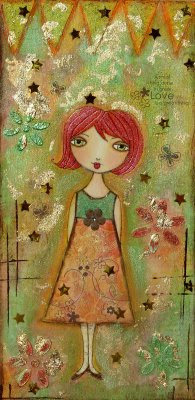
Now she is a little darker and the colors are more vibrant (like the original).
PREPARING THE FILE TO PRINTNow when you print the picture, you want to create a white background so you can judge what your print will look like on a full sheet of paper (I print mine on 8.5 X 11). You also want to have a little bit of a white border around it so your buyer will have an easier time framing it. In this case, my original is an odd size (9X12) so there will be a lot of white around the edges. (I will go into how to frame an odd size later in the post).
1. Go back to Photoshop and select "File" and then "new"
2. The popup box will allow you to create the size of the white background. Select "Preset Size" and choose 8.5 X 11. Then click "white background" at the bottom of the box.
Now you should have a white background that when printed, will come out to 8.5 X 11.
3. Now select "File" and "Open" to pull up your color adjusted picture. Ok this part I usually have to just play around with. Click on your picture and select the "move" tool on your side toolbar menu. Drag the picture into your white background. This will show you how much you will need to adjust the picture to fit into the 8.5 X 11 page.
4. To adjust the size of the picture (click on the picture) and select "Image" and then "Image Size." This is VERY IMPORTANT!! Make sure the box that says "constraint proportions" IS checked. If it is not, your picture will become blurry when you re size it. Trust me...
Now, you can adjust the size by percent or pixels; I use pixels. So, play with the "width" size and adjust until you get the picture on the white page just how you like it. You will have to keep adjusting and then moving the picture back to the white page and if you don't like it click "edit" and "step backward" to remove it. Each picture is different, so there is no standard pixel to adjust it to. (I really hope this makes sense).
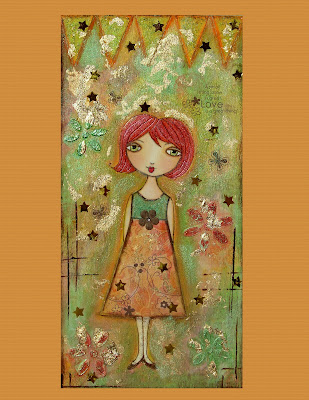
I made the background orange instead of white so you could see how it would print out on the page (yours will be white).
SENDING PICTURE TO BE PRINTED...YAY!!!
I am going to recommend an online company to have your pictures printed because after research, I decided they are the best and easiest way to get your pictures printed. You can go to a local print shop, but most of them do not specialize in art. In most cases each of your pictures will need to be viewed by a professional so any adjustments can be made. I really don't think most print shops do this. They will just mass print your pictures and not stop to look and make sure the colors look good (In my opinion).
So go to http://www.iprintfromhome.com/
You will need to set up an account (it is free) and then you can upload your pictures to them. You can choose what size to print the picture (like I said earlier, I use 8.5 X 11, but they have many sizes to choose from. You just have to make sure you adjust your white page in photoshop accordingly). They will take the time to make sure the colors in your prints come out right. We are doing most of the work in photoshop ourselves, but every printing machine is different and they will make sure the color quality is good.
The really cool thing is, I got my order in 2 days!!! You will probably pay a little more here than a local print shop, but I feel it is worth it. The last thing you want is to send poor quality out to a customer.
**Good luck everyone...I really hope this was helpful. I tried to do screenshots of each step, but couldn't figure out how to do it from my laptop (sorry). If you have any questions, please feel free to e-mail me and I will try and help the best I can.
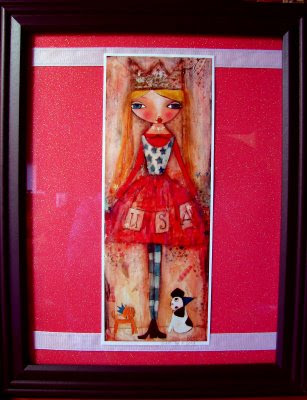
FRAMING AN ODD SIZED PRINTThe frame is 8X10 and the paper was 12X12, so again, I had to get creative. I actually cut down the paper and then glued it onto the heavy cardboard that comes with the frame. My next problem was that I had two lines from where I cut the paper. One on top and one on the bottom. So to fix THAT problem, I took some white ribbon and taped that across the top and bottom. I cut off most of the white border around the print, but I like how the white framed the picture plus she signed the bottom and I didn't want to cut that off. Voila!!! Weird print size....FRAMED!
You could also get one of those floating frames, but I have never tried one of those...